For decades, software has asked people to learn its structure. Menus, dashboards, filters, and settings encode how the product is organized. As capabilities accumulate, more of the work becomes finding the right screen.

Generative interfaces start with the outcome a person wants. The system interprets the request, retrieves the relevant data, and assembles an interface for the task. Conversation gives people a way to express intent, while charts, tables, and controls help them understand the result and act on it. A date picker is still a better way to pick a date than a sentence.
For example, a project manager who wants to know why a release is late can ask what is blocking it this week, who owns the critical tasks, and how it compares with the last release. The answer can be a short explanation, a dependency timeline, and controls to inspect or reassign work, with confirmation before a change is applied. The system assembles that view around the problem.
In Evolution of AI UX, I argued that high-agency systems need visibility and control. The same standard applies here: people need to understand what the system is showing them and remain in control of what happens next. That starts with deciding how much of the interface the model should shape.
How much freedom the model should have
I use three levels to describe that freedom: selecting a known interface, composing one from approved parts, and generating more freely. A product can use all three, depending on the task and how predictable the interaction needs to be.
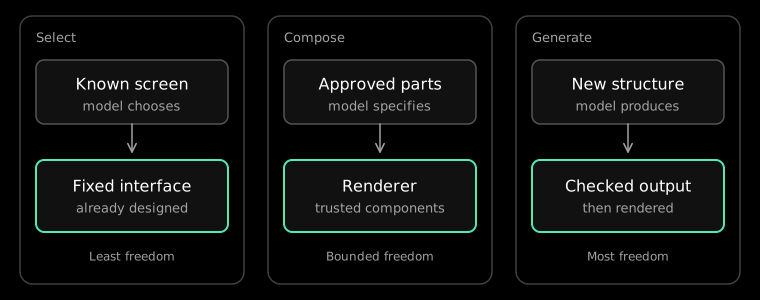
Selecting a known interface. The team designs the layout, components, and actions. The agent decides which experience fits and supplies the data. A hotel comparison, with photos, prices, and a booking action, can be one of those experiences. The model chooses when to present it, while the screen stays familiar. That predictability suits payments, bookings, and sign-in.
Composing from approved components. The team defines components, properties, valid relationships, bindings, and actions. The model writes a specification, and a renderer turns it into real components. The renderer keeps responsibility for accessibility, styling, and which actions exist. A revenue question can become a line chart, a few metrics, and a date range. A retention question can become a cohort view and a comparison table, using the same system in a different arrangement. JSON Render (opens in new tab) and OpenUI Lang (opens in new tab) are two ways to express that specification. Composites let the model work with larger, known patterns, such as a metric row above a chart, instead of arranging every component individually.
Generating more freely. Some requests have no prepared screen. A one-off view of an unusual dataset may need markup or components produced for that question. That freedom needs validation, a restricted runtime, and attention to accessibility, performance, and visual consistency. A control the team has already designed is often the better choice when the interaction should stay predictable.
A payment step can stay fixed while an analysis workspace is composed and a rare chart is generated. The amount of freedom should match the cost of being wrong.
Embedding is a separate problem
Once an interface is selected or composed, it needs somewhere to run. That may be the product’s own application or an assistant the person already uses. The Model Context Protocol lets an assistant call tools and read data, but some results benefit from more than text. A hotel search, a portfolio chart, or a calendar can be clearer as an interactive view.
MCP Apps (opens in new tab), introduced as an official MCP extension in January 2026, lets a tool return a result the model can read and, in a compatible host, an interface a person can operate. The interface runs in isolation and talks to the host through a bridge. This handles embedding; selection, composition, or open generation determines what appears inside. Host support, authentication, and distribution still decide whether a published server is reachable.
The surrounding tools address other parts of the system. JSON Render and OpenUI specify an interface for a renderer. A2UI (opens in new tab) aims at a description that different clients can render without receiving executable UI code. AG-UI (opens in new tab) carries events and shared state between an agent and a frontend. These tools can work together because connectivity, embedding, composition, and rendering solve different problems.
Embedding also changes distribution. A capability can appear inside an assistant at the moment someone expresses a relevant intent, bringing the product into a workflow that is already underway. The website and native app still provide a home for the brand, the customer relationship, and stable workflows. Reaching people through an assistant adds another channel, with the tradeoff that its platform sits between the product and its customers.
Design knowledge has to be readable by the model
Wherever the interface appears, composing it well takes more than a catalog of charts, tables, and buttons. The model also needs to know when each one belongs, which combinations hold together, and how to rank what matters. Reliable composition needs that judgment in a form the system can apply: what a component means, which relationships are valid, which actions are available, and which accessibility and interaction constraints hold.
SAP's Compositional Design System (opens in new tab) separates coded primitives, declarative composites, and the rules for assembling them, including meaning and accessibility. In Joule Work, a Space can be composed around the task. Someone handling customer returns can ask for the records, views, and actions that belong together. A traditional design system standardizes what people build. A compositional one also guides what a machine may assemble.
Building this way shifts effort toward trustworthy components, data contracts, and explicit design rules. The quality of the generated experience depends on those foundations as much as on the model.
A rendered tree can still miss the task
Even with those foundations, a component tree can render correctly and still miss the task. A chart may be numerically correct but emphasize the wrong comparison, or the view may omit the action the person needs. Evaluation has to consider whether the assembled interface helps someone complete the work.
That includes accessibility across the whole arrangement. Heading order, names, focus, and hierarchy can fail even when every individual component has passed its own checks.
Authorization stays outside the generated tree. Authentication, permissions, and validation apply to the operation itself. The interface can offer an action, but a trusted service decides whether it runs.
Performance has a similar boundary. Calling a model for every click makes the product slow and unpredictable. Use the model to interpret intent and compose the interface, then let ordinary state and queries handle routine interaction. OpenUI's split between the initial specification and later reactive updates is one way to keep the result feeling like normal software.
People also need continuity as they work. An interface that reorganizes itself on every turn has to be relearned, even if each new arrangement is valid. Adaptation is useful when it removes steps and preserves enough familiarity for the person to keep moving.
Build capabilities, constraints, and parts
For product teams, this means designing capabilities, constraints, and building blocks alongside screens. Services need contracts a machine can call, data must remain authoritative, and components need meaning as well as style. Those pieces let a product serve people through an assistant while supporting a deliberately designed application for workflows that benefit from one.
The protocols and frameworks will keep changing, but the direction is clear: someone states a goal, an agent reaches the capabilities that can serve it, and the interface supplies the information and controls for that task. The test I use is whether the person can finish the work without first learning the whole product.